Every school campus. Every hotel floor. Every managed facility.
An issue appears. Someone writes it on a clipboard, takes a photo, sends an email, or mentions it during a shift change. The report moves from one person to another. Details become harder to find. Ownership remains unclear. The original issue stays open longer than it should.
Incident reporting is not the same as incident resolution.
For multi-location organizations, the difference matters. A report only creates value when it leads to a documented response, assigned corrective action, verified completion, and clear insight into what should happen next.
That is where incident management software changes the workflow. It connects the full process:
Report. Assign. Track. Resolve. Verify. Close. Report.
Paper captures the moment. Connected workflows manage the outcome.
Paper forms, spreadsheets, and email threads often seem manageable when incident volume is low. They become difficult to control as operations expand.
Delay hides risk
A paper report may sit in an office until someone has time to review it. An email may reach the wrong person, or remain buried in a crowded inbox. By the time the issue is assigned, the conditions may have changed.
Digital incident reporting moves information into a central system immediately. Managers can see what happened, where it happened, and what requires attention without waiting for a manual handoff.
Detail gets lost
A short note such as “leak near back entrance” does not provide enough context for effective follow-up. Teams need the location, date and time, people involved, affected asset, severity, evidence, and immediate response.
Without consistent fields, every report looks different. Investigations take longer. Teams spend time reconstructing the event instead of correcting the cause.
Accountability becomes unclear
An incident sent by email may have several recipients but no clear owner. A spreadsheet may show an open item but not who is responsible for the next step.
Incident management software assigns ownership, due dates, statuses, and escalation paths directly within the record. Everyone can see what is assigned, what is late, and what has been completed.
Patterns remain hidden
When incident data is stored across binders, inboxes, and disconnected files, recurring issues are difficult to identify. A recurring equipment problem may appear as separate events at multiple locations. A repeated safety issue may never reach central operations.
Centralized records make those patterns visible.
A complete incident record leaves nothing important behind
A useful incident record answers more than “what happened?”
It creates a reliable operational history that supports response, investigation, audit preparation, and prevention.
A complete record should capture:
- What happened: A clear description of the event, hazard, failure, or observation.
- Where it happened: The facility, room, department, work area, or asset involved.
- When it happened: The date and time of discovery, response, and follow-up.
- Who was involved: The reporter, affected parties, witnesses, reviewer, and action owner.
- What evidence exists: Photos, notes, documents, inspection results, or related records.
- How serious it is: Risk level, severity, impact, and immediate containment requirements.
- Why it happened: Investigation notes and root-cause findings.
- What must change: Corrective actions, preventive actions, procedure updates, or training needs.
- How completion was verified: Evidence that the action worked and the issue can be closed.
This structure creates consistency across schools, hotels, facilities, and other distributed operations. It also supports the closed-loop approach described in the InspectU corrective action framework.
The objective is not to create longer forms. It is to capture the information needed to make the next decision clear.
The incident loop: from report to verified closure
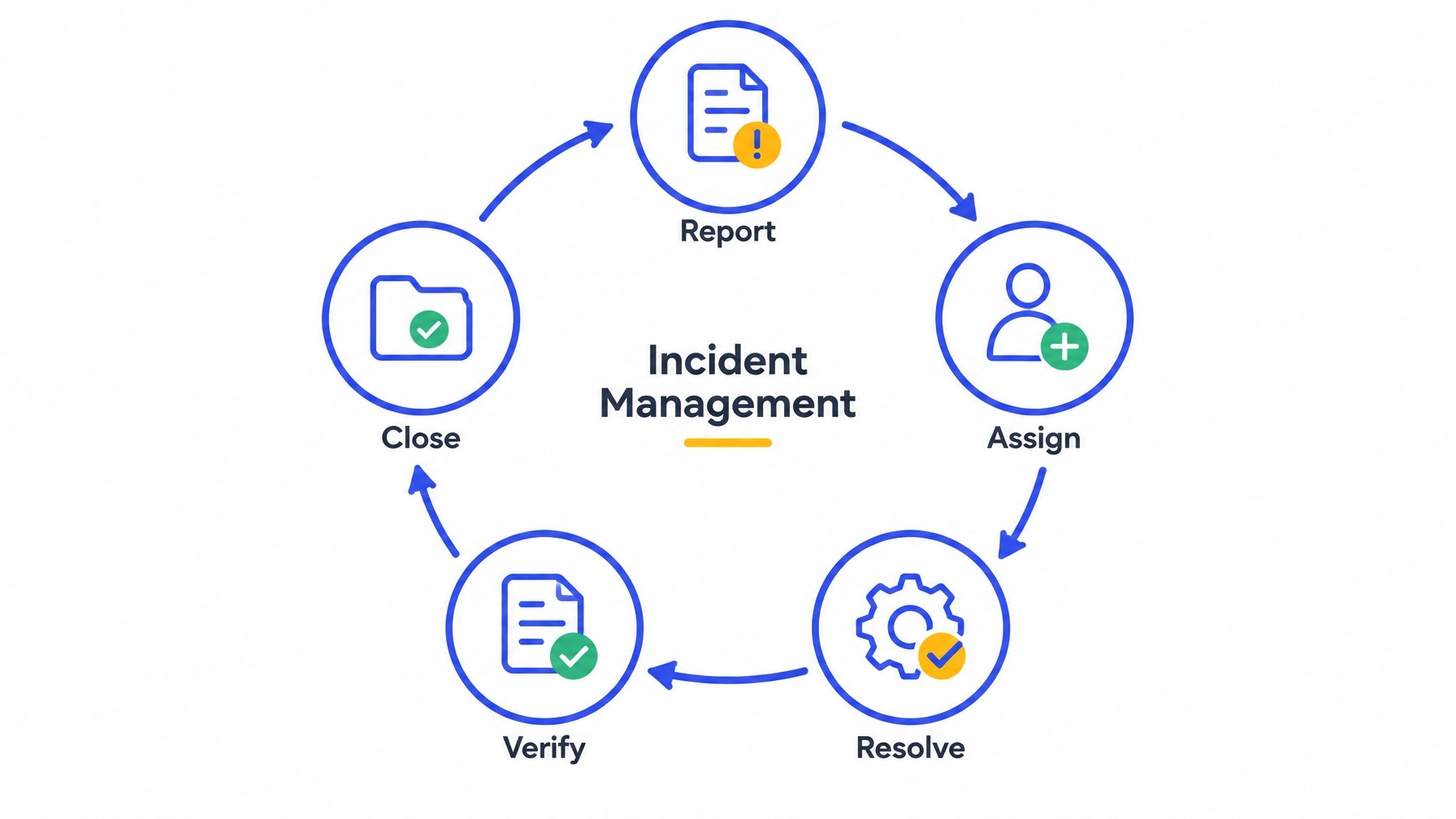
A strong incident workflow follows a defined sequence.
1. Report
Employees and managers need a simple way to document issues where they occur. A mobile inspection app allows teams to submit an incident from a kitchen, guest room, mechanical room, classroom, or service area.
The report can include structured fields, notes, and photo evidence. Offline capability is especially important for locations with weak or inconsistent connectivity. Teams can capture information in the field and synchronize it when a connection is restored.
2. Assign
The incident should move to the right person or team without requiring manual forwarding. Ownership may depend on location, incident type, severity, department, or affected asset.
One owner. One due date. Clear accountability.
3. Resolve
The original incident should generate a corrective action or task. That action may include repairing equipment, removing a hazard, updating a procedure, completing additional training, or conducting a follow-up inspection.
This is where incident management connects with task management. The issue is no longer a static report. It becomes active work with a status, deadline, and documented progress.
4. Verify
Completion is not always the same as effectiveness. A task may be marked complete because a repair was performed, but a supervisor may still need to confirm that the hazard is gone or that the process now works as intended.
Verification protects the organization from closing issues too early.
5. Close
An incident should close only when the response, corrective action, evidence, and verification are documented. The final record becomes part of the organization’s searchable history.
That history supports future inspections, reviews, training, and decision-making.
Turn findings into owned corrective actions
Incident management software should connect reports to action without duplicating data.
With InspectU, organizations can use customizable inspection and checklist workflows to record incidents and findings. Conditional logic can require follow-up when a response indicates a problem. Findings can then become assigned tasks with owners, due dates, and progress tracking.
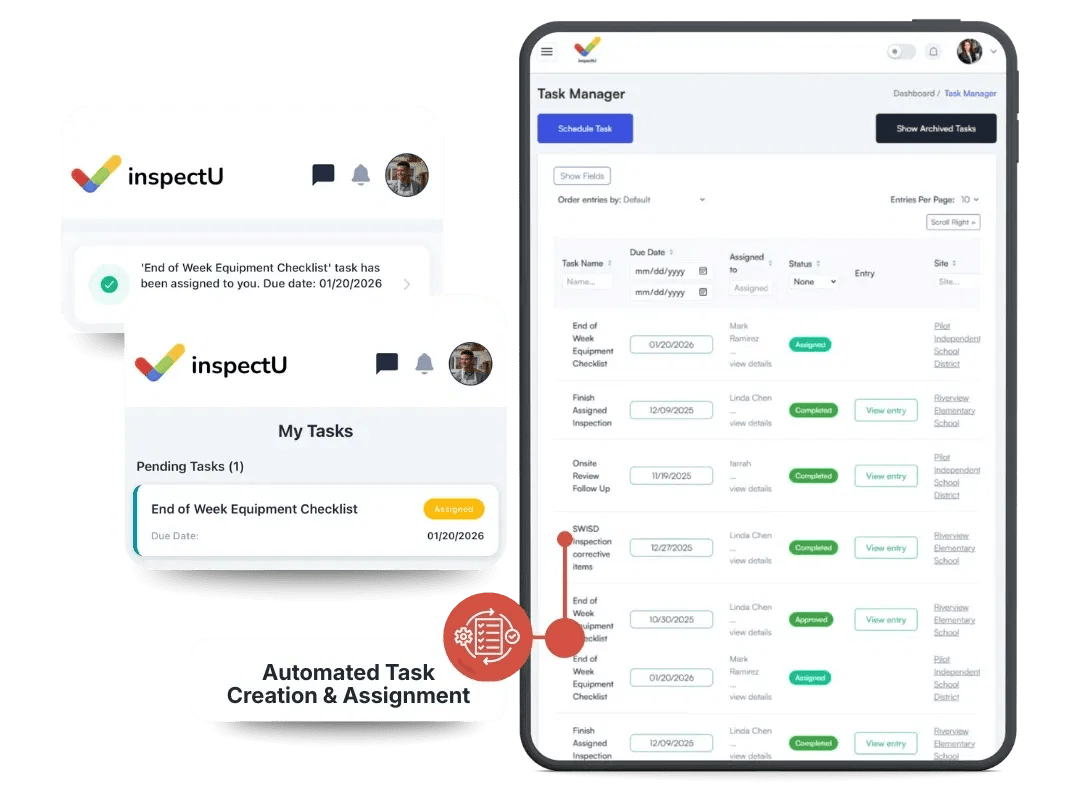
This creates a practical corrective action workflow:
- Capture the issue.
- Assess severity and immediate risk.
- Document the likely root cause.
- Define a specific corrective action.
- Assign the action to one accountable owner.
- Track progress and due dates.
- Attach completion evidence.
- Verify effectiveness.
- Close the incident with a complete record.
The process is structured without forcing every organization into the same template. InspectU supports custom forms, reports, workflows, and standards so teams can digitize existing processes instead of replacing them with a rigid system.
See recurring issues across every location
A local incident may be isolated. Or it may be part of a larger pattern.
Operations managers need visibility across facilities, not just within individual sites. A connected system can help identify:
- Repeated incidents involving the same asset or equipment type.
- Similar hazards appearing across multiple locations.
- Departments with overdue corrective actions.
- Incident categories increasing over time.
- Locations with higher open-incident volumes.
- Recurring issues that require a policy, training, or process change.
This is where incident data becomes operational intelligence.
For example, a facility management organization may discover that several sites are reporting the same door hardware failure. A hospitality group may see repeated sanitation incidents linked to one process. A school nutrition program may identify recurring temperature or equipment issues across multiple kitchens.
Without centralized data, each event remains local. With connected inspection software, teams can identify the broader issue and respond at the right level.
Use incident data to improve audit readiness
Auditors and internal reviewers typically need more than a list of reported incidents. They need evidence that the organization identified issues, assessed risk, assigned responsibility, took action, and verified the result.
A centralized incident record provides that trail.
InspectU brings inspections, tasks, records, documents, and reporting into one platform. Teams can maintain consistent documentation across locations and retrieve records without searching through email chains or physical binders.
For school nutrition teams, this supports broader compliance tracking across site monitoring, HACCP verification, OSHA requirements, corrective actions, and administrative review preparation.
For hospitality teams, it supports consistent oversight across kitchens, guest areas, facilities, food safety, fire and life safety, and brand standards. For facility managers, it connects safety inspections, maintenance activity, and follow-up work in one workflow through facility management software.
Ready records. Clear ownership. Fewer last-minute scrambles.
InspectU connects incident reporting with daily operations
Incident management should not exist as another disconnected tool.
InspectU gives teams a connected system for inspections, checklists, corrective actions, training, asset information, documents, records, and reporting. Teams can work across web and mobile devices, capture information offline, add photos and notes, create follow-up tasks, and monitor activity through real-time analytics.
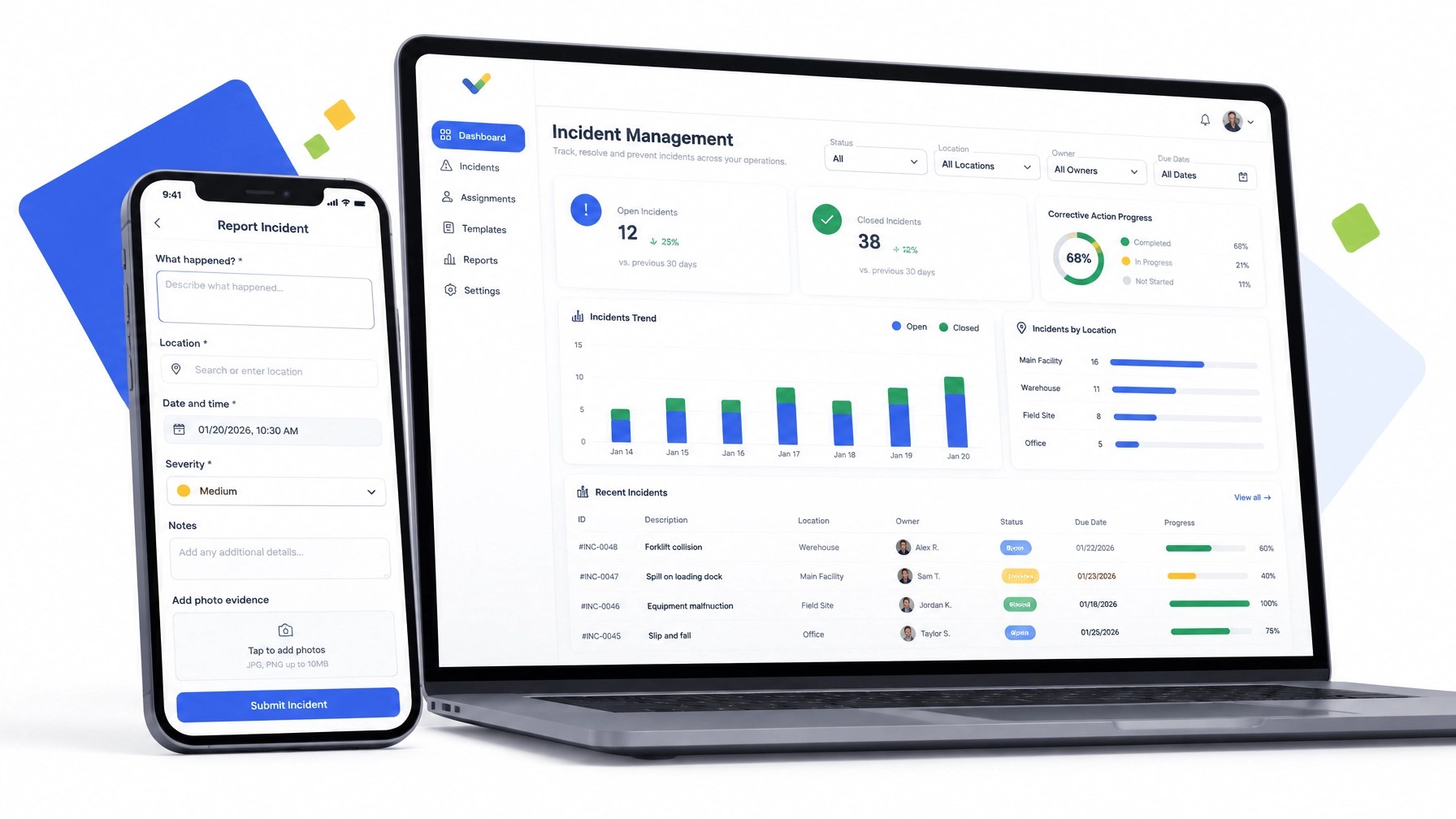
The result is a practical workflow for distributed operations:
- Capture incidents where work happens.
- Preserve details and evidence.
- Route findings to the right owner.
- Track corrective actions to completion.
- Verify that the fix addressed the issue.
- Close the record with confidence.
- Use trends to prevent recurrence.
Everything connected. Nothing lost.
Move from incident reports to resolved actions
Paper forms document what someone noticed. Email threads show who was contacted. Spreadsheets list what may still be open.
A connected incident workflow does more. It gives your team a complete path from discovery to resolution.
If your organization operates across multiple schools, hotels, facilities, or sites, incident management software can provide the consistency and visibility needed to maintain standards at scale.
Start with the workflow your team already uses. Digitize the form. Define ownership. Set escalation rules. Connect findings to corrective actions. Build verification into closure.
Then turn every incident into more than a record.
Turn it into action, accountability, and prevention.
Explore InspectU or sign up for free.
SEO title: Incident Management Software: Turn Reports Into Resolved Actions
Meta description: Learn how incident management software helps multi-location teams report issues, assign corrective actions, track resolution, verify results, and improve audit readiness.
Focus keyword: incident management software
Tags: incident management software, safety inspection software, compliance tracking software, mobile inspection app, operations management software, corrective action tracking, incident reporting, audit readiness, facility management, hospitality compliance, K-12 compliance, multi-location operations